
Beyond Software: The Infrastructure Behind Business Reliability
When your business software slows down, crashes, or fails to support daily operations, it is easy to assume the application itself is the problem. Many companies respond by upgrading ERP systems, replacing CRM platforms, moving workloads to the cloud, or adopting AI tools in the hope of improving speed, uptime, and productivity.
But software can only perform as reliably as the infrastructure supporting it. Behind every business application is a larger system of servers, storage, networks, security controls, monitoring processes, power equipment, and maintenance routines. If that foundation is unstable, even the most advanced software may still suffer from latency, downtime, data interruptions, and poor user experience.
This is why modern organizations need to look beyond software alone. True business reliability comes from understanding the full technology stack beneath the application layer — including the physical systems that keep critical infrastructure running when unexpected failures occur.

Why Better Software Doesn’t Always Solve Business Problems
When a business system starts to feel slow, unstable, or difficult to scale, the first response is often to upgrade the software. A company may replace its ERP platform, move its CRM system to the cloud, add new automation tools, or invest in advanced analytics. On paper, these upgrades look like progress.
But many teams discover the same problem after the investment: the cost has increased, the software looks newer, yet the daily user experience has not improved enough. Applications still load slowly, remote teams still face interruptions, and critical workflows still depend on systems that are not always available when the business needs them.
The reason is simple: software is only one layer of a much larger business technology stack. The real experience your users feel is shaped by everything underneath the application, including cloud resources, servers, storage, network stability, power reliability, and maintenance discipline. If those layers are weak, better software alone cannot create a reliable business environment.

The practical lesson is clear: before assuming the software is the problem, businesses should examine the full infrastructure behind it. A modern application can only deliver stable results when the underlying cloud environment, server capacity, network connection, power system, and maintenance process are working together.
The Real Cost of Unreliable Infrastructure
Most organizations evaluate IT infrastructure through a technical lens: uptime percentages, server capacity, cloud performance, or network latency. But in reality, infrastructure is not a technical layer—it is a business continuity system.
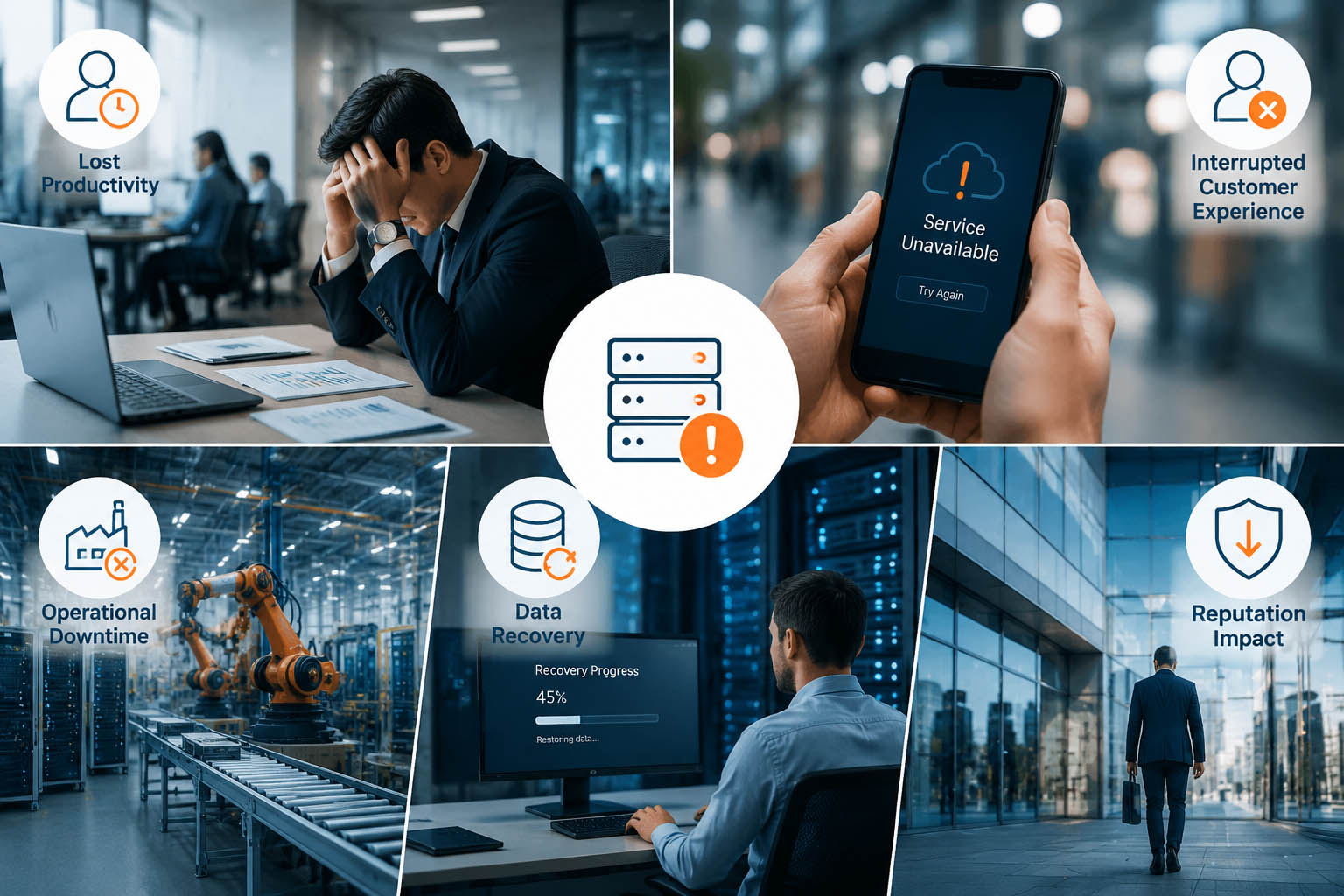
When infrastructure becomes unreliable, the impact does not stay within IT operations. It spreads directly into how employees work, how customers interact with your services, and how revenue flows through your systems. The cost is not a single incident—it is a continuous accumulation of friction across the entire organization.
This is why infrastructure failures are often misunderstood. They rarely appear as a single catastrophic breakdown. Instead, they show up as small, repeated disruptions that slowly erode productivity, trust, and operational stability.
The Six Foundations of Reliable Business Systems
Most organizations evaluate system reliability in a fragmented way. IT teams look at servers, cloud providers, or network uptime independently, while business teams only focus on whether applications are “working” or “not working”. However, modern digital operations are no longer driven by isolated components — they are driven by interconnected systems where every layer directly influences business continuity.
A failure in one layer rarely stays contained. A small performance issue in computing resources can cascade into application latency; storage bottlenecks can slow down entire workflows; network instability can break real-time services; and security gaps can compromise operational integrity. This is why reliable business systems must be understood as a multi-layer dependency chain, not a collection of independent tools.
More importantly, organizations often overlook the physical foundation that supports the entire digital stack. While computing, storage, and networking are widely discussed, the stability of power supply and system monitoring is frequently underestimated. Yet in real-world operations, these “invisible layers” often determine whether a system remains stable under pressure or fails during critical workloads.

Why Power Reliability Is Becoming Part of Modern IT Strategy
For many years, power was treated as a facilities issue rather than an IT priority. If the lights stayed on and the server room had a basic backup system, most organizations assumed power planning was already handled. That view worked when business software mainly depended on centralized servers and office networks.
Today, the situation is different. Modern business operations now rely on edge computing, industrial IoT devices, retail POS systems, healthcare equipment, manufacturing controllers, and remote monitoring terminals. These systems are not just passive endpoints connected to the cloud. They often collect data, process signals, trigger workflows, control equipment, or keep customer-facing services running locally.
That means cloud availability alone is no longer enough to guarantee business continuity. A cloud platform may remain online, but if a local gateway loses power, a warehouse scanner shuts down, a PLC controller restarts, or a medical device fails during operation, the business process still breaks. In this environment, power reliability becomes part of the IT architecture, not a separate building-management concern.
The real question is no longer only “Is the software available?” It is also “Can the physical systems that support the software continue operating when power conditions change?” This shift is why IT leaders increasingly need to evaluate local devices, power continuity, backup planning, and maintenance routines as part of the same reliability strategy.
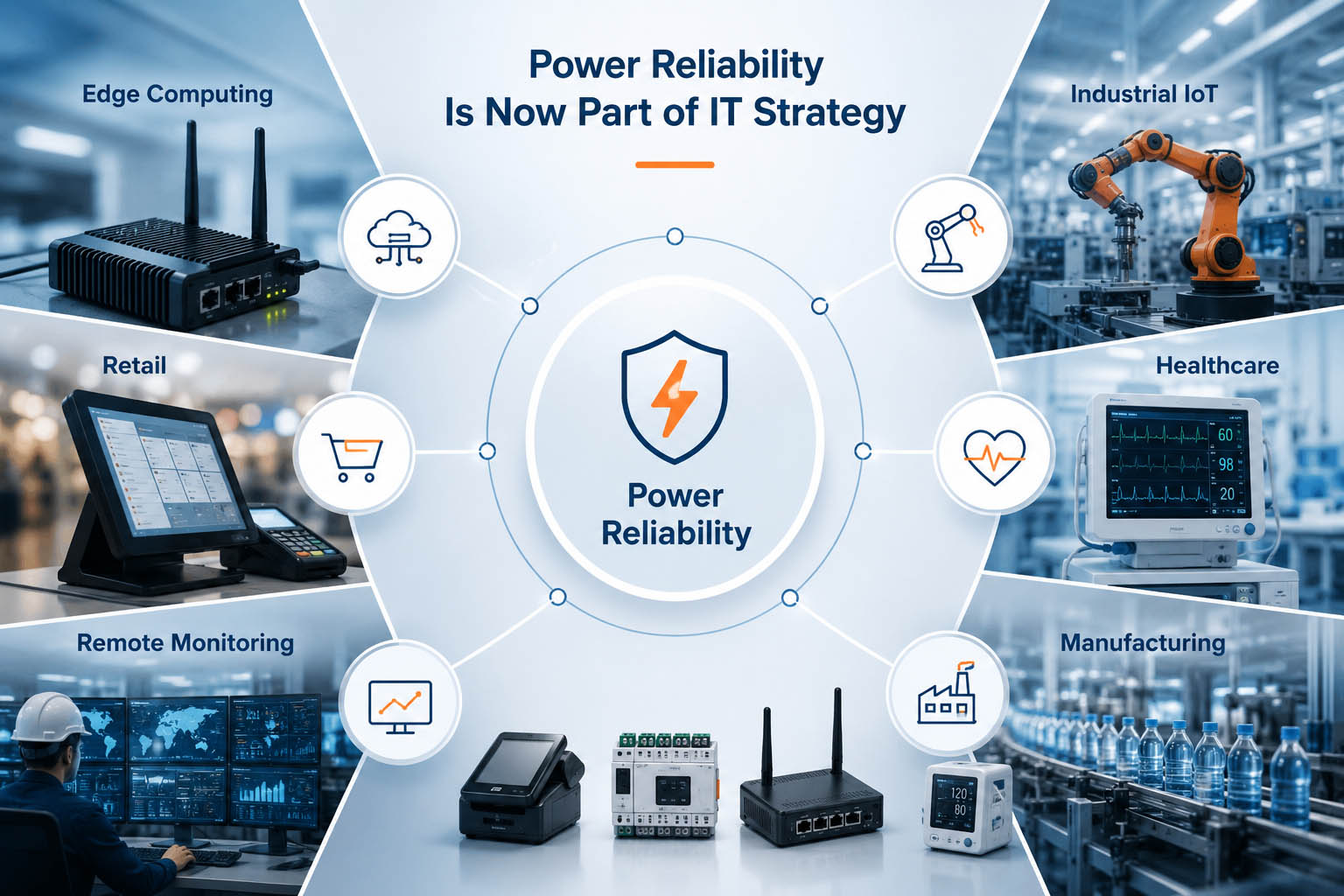
Consider a retail environment. The central inventory platform may be cloud-based and fully functional, but the business still depends on POS terminals, barcode scanners, payment devices, and local network equipment. If those endpoints lose power, the customer experience breaks at the point of sale, even though the software platform itself is still available.
The same pattern appears in manufacturing. A PLC controller, industrial gateway, or production-line monitoring terminal may only need a small amount of power compared with a full server room, but its failure can stop an entire process. In healthcare, a medical monitoring device or local diagnostic terminal may become a continuity risk if power interruptions are not considered during infrastructure planning.
This is the strategic shift: power reliability is no longer only about keeping a building operational. It is about keeping business-critical digital workflows alive across distributed devices, local infrastructure, and real-world operating environments.
Preventive Maintenance Is More Than Software Updates
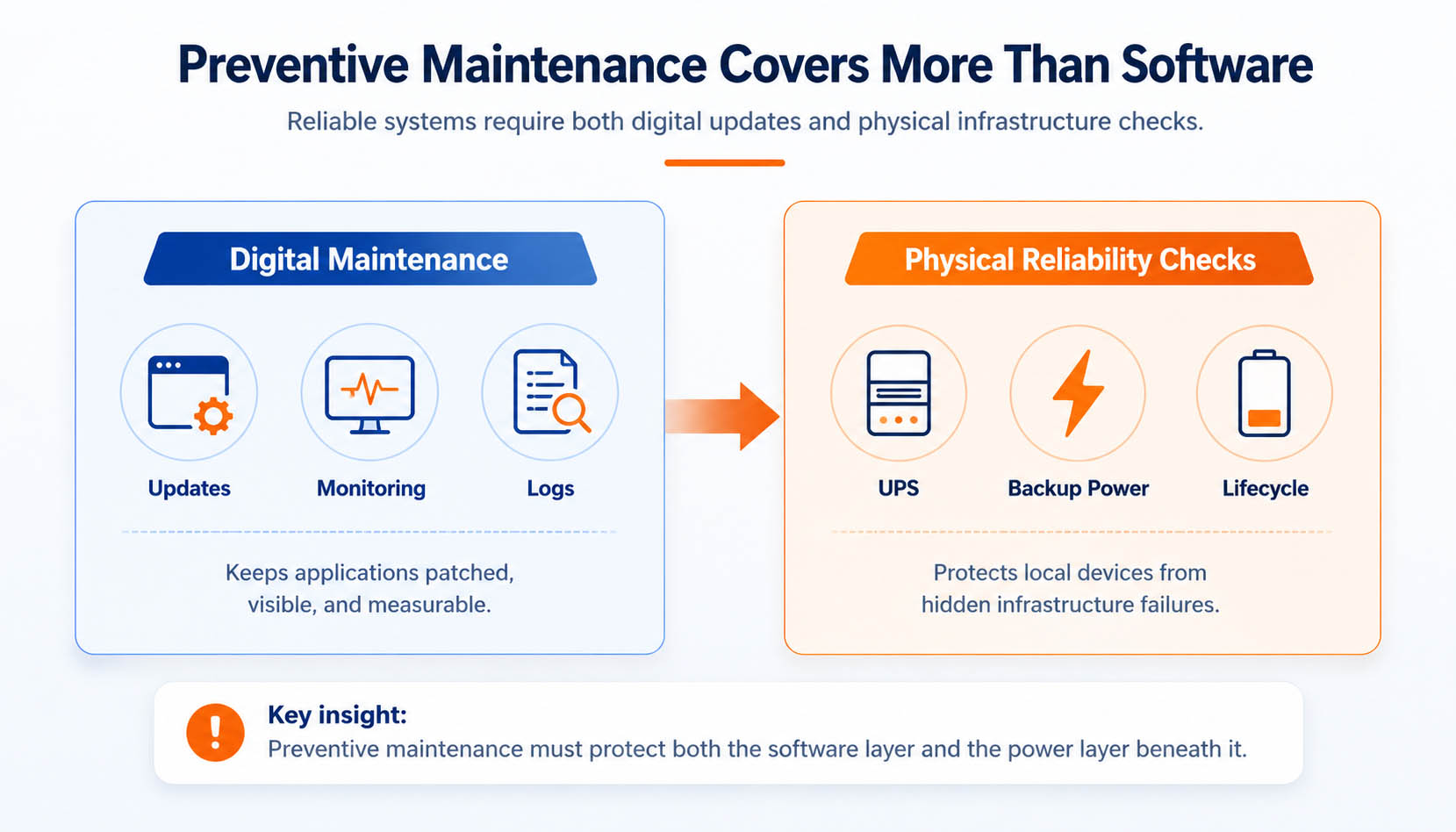
Preventive maintenance is often treated as a software discipline. IT teams schedule operating system updates, apply security patches, monitor logs, review error alerts, and check application performance dashboards. These tasks are important, but they only cover the visible digital layer of the business system.
In real operations, many failures begin outside the application layer. A point-of-sale terminal may stop responding because the local power unit was never tested. A warehouse gateway may restart during a brief power fluctuation. A medical terminal may pass software diagnostics but still fail when its backup power system can no longer support the expected runtime. These are not software bugs, yet they can interrupt the same business workflows that software is supposed to protect.
That is why a stronger maintenance strategy must include the physical infrastructure behind the software: UPS inspection, backup power testing, power supply health checks, device restart simulation, and backup battery lifecycle planning. If these areas are ignored, a business may believe its systems are protected while the real point of failure is quietly aging in the background.
Many organizations include regular inspections of rechargeable backup battery systems as part of their preventive maintenance strategy to reduce unexpected downtime in critical devices. In this context, the battery system is not being treated as a product accessory; it is being treated as a reliability component that must be checked, tested, and replaced before failure occurs.
This matters especially in industrial controllers, embedded systems, medical devices, and network equipment. Many of these devices are expected to continue operating during short interruptions, safe shutdown events, or local power instability. For that reason, businesses often rely on custom rechargeable battery packs as part of a broader backup design that supports the device’s voltage, runtime, space, connector, and safety requirements.
The professional lesson is clear: software maintenance protects code, but infrastructure maintenance protects continuity. A mature IT strategy should not wait for a failed endpoint, drained backup system, or unstable power path to reveal the weakness. It should identify these risks early, document them clearly, and test them regularly before they interrupt business operations.
Building Infrastructure That Supports Long-Term Business Growth
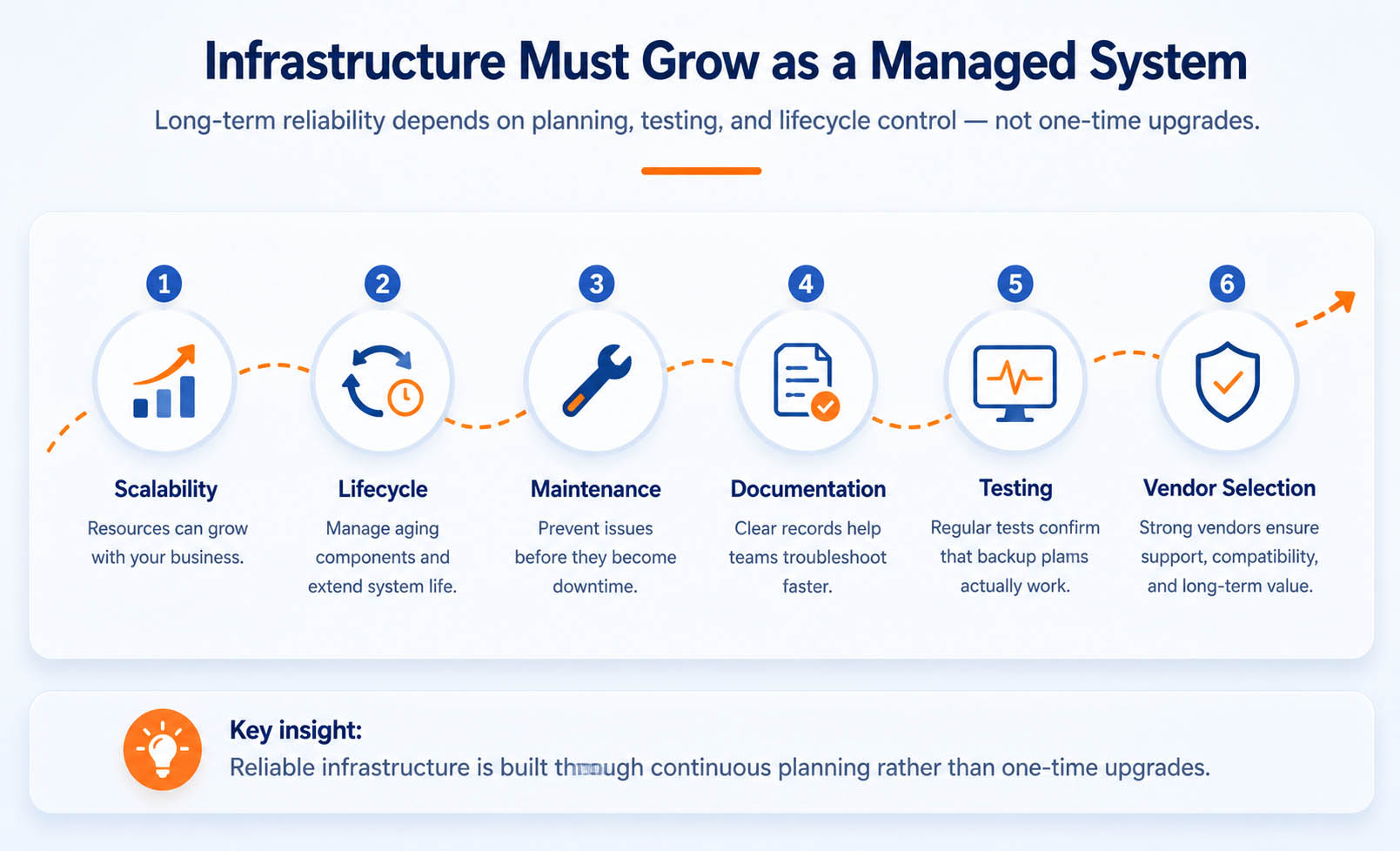
Reliable infrastructure is not built by a single upgrade. It is built through continuous planning, lifecycle management, testing, documentation, and disciplined vendor selection. As your business grows, the infrastructure behind your applications must be able to support more users, more data, more devices, and more operational complexity without becoming fragile.
This is where many organizations make the wrong decision. They scale the visible software layer first, but delay the less visible foundations that keep the system stable. A new application may be deployed successfully, yet performance still suffers if computing resources are undersized, storage policies are unclear, network design is outdated, documentation is incomplete, or maintenance responsibilities are not assigned.
Long-term growth requires infrastructure that can be evaluated as a living system. Scalability ensures that resources can expand with demand. Lifecycle planning prevents aging components from becoming hidden failure points. Preventive maintenance reduces unexpected interruptions. Technical documentation helps teams troubleshoot faster. Regular testing confirms whether backup plans actually work. Vendor selection determines whether support, compatibility, and replacement options remain available over time.
This planning should also include the systems that keep critical infrastructure operating during interruptions. When evaluating infrastructure investments, organizations should consider both software platforms and the supporting backup power solutions required to keep critical systems operating during unexpected interruptions.
This does not mean every organization needs the same power design. A cloud-first software company, a retail chain, a healthcare provider, and a manufacturing facility will all have different operational risks. The goal is not to overbuild infrastructure. The goal is to map each critical workflow to the devices, networks, and local power conditions it depends on, then plan accordingly.
In the long run, infrastructure maturity is what allows software investments to keep producing value. A business can continue adding new platforms, tools, and automation systems, but without reliable foundations behind them, each new layer may increase complexity instead of improving resilience.
Key Takeaways
Reliable business performance does not come from software alone. A company may invest in better applications, faster cloud platforms, and more advanced digital tools, but those investments only create value when the full operating environment can support them consistently.
The stronger way to think about business reliability is to view every digital workflow as a chain. Business software gives teams the tools to work. IT infrastructure gives those tools a stable foundation. Power reliability keeps critical local devices available when conditions change. Preventive maintenance reduces hidden failure points before they interrupt operations. Together, these layers create real business continuity.
The most important lesson is not that every company needs more systems. It is that every company needs a clearer understanding of what its existing systems depend on. Once that dependency chain is visible, infrastructure decisions become more strategic, maintenance becomes more proactive, and software investments become easier to protect over the long term.
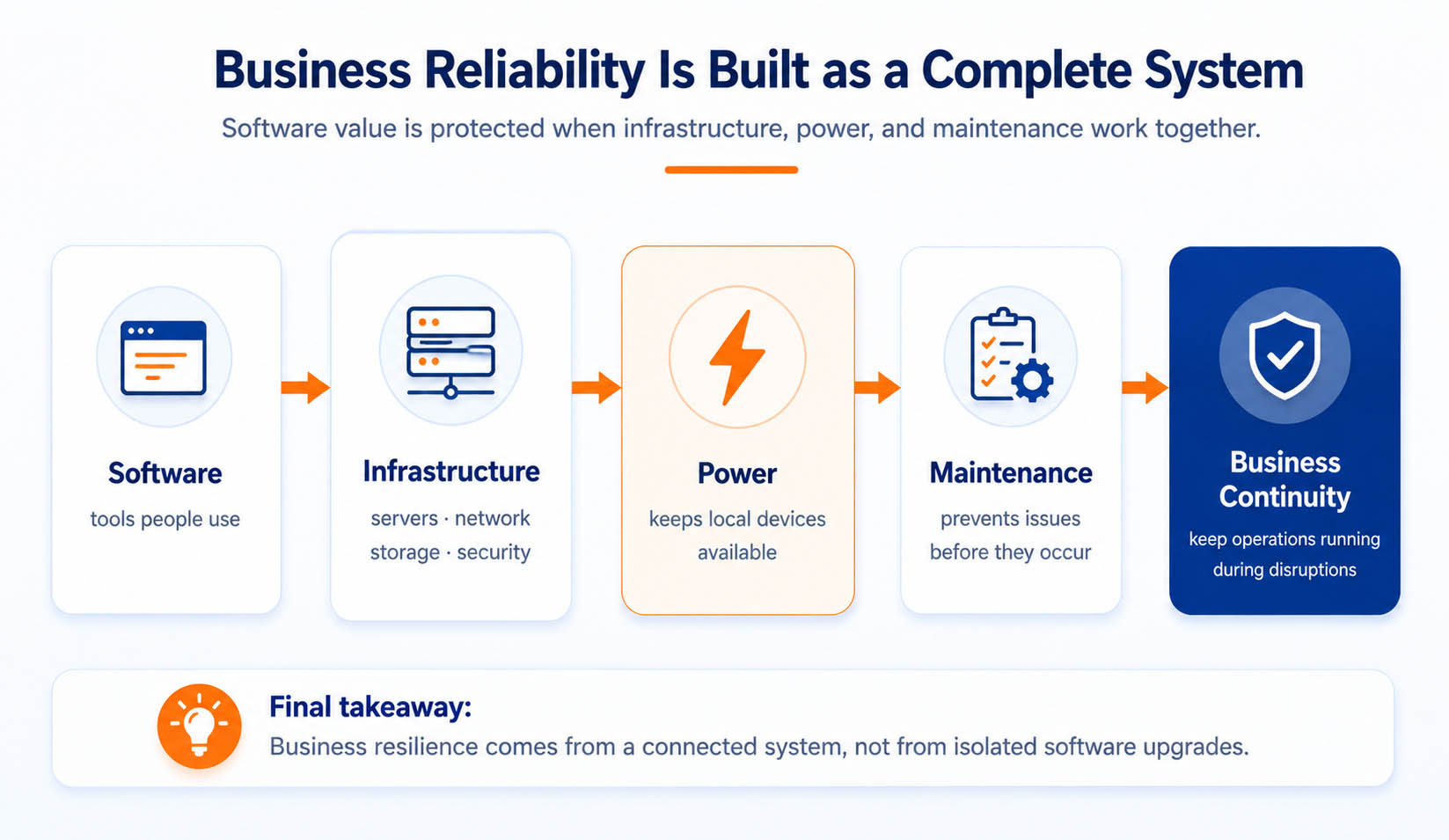
If you want stronger business performance, do not only ask whether your software is modern. Ask whether the infrastructure beneath it is visible, tested, maintained, and capable of supporting critical workflows when conditions change.
In the end, the businesses that gain the most from digital transformation are not simply the ones that buy the newest tools. They are the ones that build reliable foundations around those tools — so applications, devices, teams, and customers can continue operating with confidence.
FAQ
These questions focus on the practical concerns business and IT teams face when software performance, infrastructure reliability, and business continuity start to overlap.
Why does business software still experience downtime after upgrades?
Because software is only one part of the business system. Even after an application upgrade, downtime can still occur if the underlying IT infrastructure is unstable. Servers may be overloaded, storage may respond slowly, network paths may be unreliable, or local devices may lose power. A software upgrade improves the application layer, but it does not automatically fix the infrastructure layer that supports it.
What is the most overlooked part of IT infrastructure?
One of the most overlooked areas is power reliability. Many companies monitor software, servers, and networks carefully, but they do not inspect UPS systems, backup power paths, local device power stability, or aging backup components with the same discipline. This can leave critical workflows exposed during short interruptions, local outages, or equipment restarts.
How often should IT infrastructure be inspected?
IT infrastructure should be inspected on a scheduled basis, not only after problems appear. Software monitoring may be continuous, while servers, network equipment, UPS systems, backup power units, device health, and lifecycle status should be reviewed regularly according to business criticality. High-dependency environments such as healthcare, retail operations, warehouses, and manufacturing sites should treat infrastructure inspection as part of routine operational risk management.
Is cloud software enough to guarantee business continuity?
No. Cloud software can improve availability, scalability, and remote access, but it cannot guarantee continuity for every real-world workflow. Businesses still depend on local hardware, network equipment, edge devices, power supply, and maintenance routines. If those local systems fail, the cloud application may remain online while the business process still stops.
Why are backup power systems important for edge computing?
Edge computing depends on local processing, local devices, and local decision-making. These systems cannot always wait for cloud recovery or remote intervention. Backup power systems help keep gateways, sensors, controllers, and local terminals operating during short disruptions, allowing data collection, equipment control, and business workflows to continue without immediate failure.
What devices usually require rechargeable backup batteries?
Common examples include industrial controllers, medical devices, IoT gateways, POS systems, remote sensors, and network equipment. These devices often support critical workflows at the edge of the business environment, so backup energy is used to prevent sudden shutdowns, support safe operation, or maintain continuity during short interruptions.
How do businesses reduce unexpected infrastructure failures?
Businesses reduce unexpected failures by combining preventive maintenance, monitoring, documentation, redundancy planning, power testing, and battery replacement planning. The goal is to identify weak points before they interrupt operations. A reliable environment is not created by one upgrade; it is maintained through repeated inspection, testing, and lifecycle control.
What’s the difference between infrastructure performance and infrastructure reliability?
Infrastructure performance focuses on speed, capacity, and response time. Infrastructure reliability focuses on availability, predictability, recoverability, and stability under real operating conditions. A system can be fast when everything is normal but still unreliable if it fails during load spikes, power changes, network issues, or maintenance events.
Can preventive maintenance reduce IT operating costs?
Yes. Preventive maintenance can reduce IT operating costs by lowering downtime, reducing emergency repair work, preventing avoidable replacement costs, and minimizing business disruption. It also helps teams plan upgrades more intelligently because infrastructure health is visible before failure forces urgent decisions.
What should companies evaluate before upgrading enterprise software?
Before upgrading enterprise software, companies should evaluate more than application features. They should review IT infrastructure, server capacity, storage design, network stability, power reliability, backup planning, security controls, maintenance responsibilities, and lifecycle risks. This creates a clearer view of whether the business is ready to support the new software reliably.