
Universal Remote Codes Not Working? A Complete Troubleshooting Guide
Many users run into the same problem when setting up a universal remote: you enter the right code, but your TV, cable box, sound system, or streaming device still does not respond.
At that point, it is easy to assume the code list is wrong or the remote is not compatible. In reality, the code is not always the real issue. Weak batteries, reduced infrared signal strength, the wrong device mode, missed setup steps, or aging remote hardware can all stop a correct code from working.
This guide walks you through the most common reasons universal remote codes fail and shows you how to troubleshoot the problem step by step before wasting more time trying random codes.
Why Universal Remote Codes Sometimes Fail Even When They Are Correct
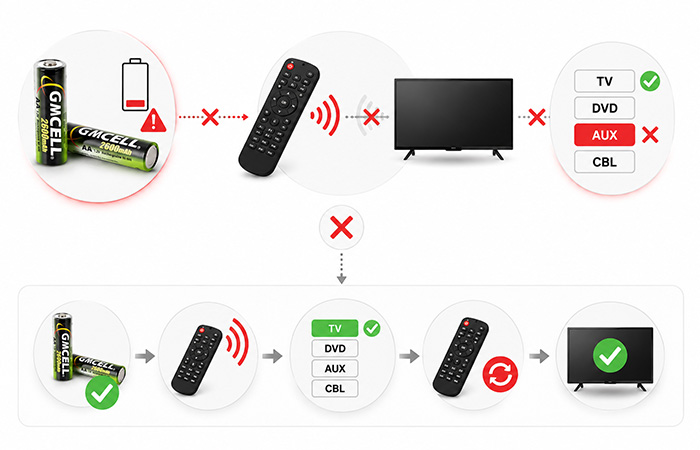
A universal remote code is only a way to translate your remote’s button commands into signals your TV, cable box, soundbar, or streaming device can understand. The code may be correct, but the remote still has to send that command clearly, and the device still has to receive it properly.
This is why a correct code does not always mean the remote will work immediately. If the signal is weak, the remote is in the wrong device mode, or the setup sequence is incomplete, the result can look exactly like a wrong code problem.
You may notice problems such as:
The LED lights up, but the TV does not respond.
Some buttons work, while others do nothing.
Setup appears successful, but the device cannot be controlled.
In other words, many universal remote codes not working issues happen outside the code itself. Before searching for another code list, it is better to check the parts of the remote system that actually send and deliver the command.
Start With the Simplest Check: Your Batteries
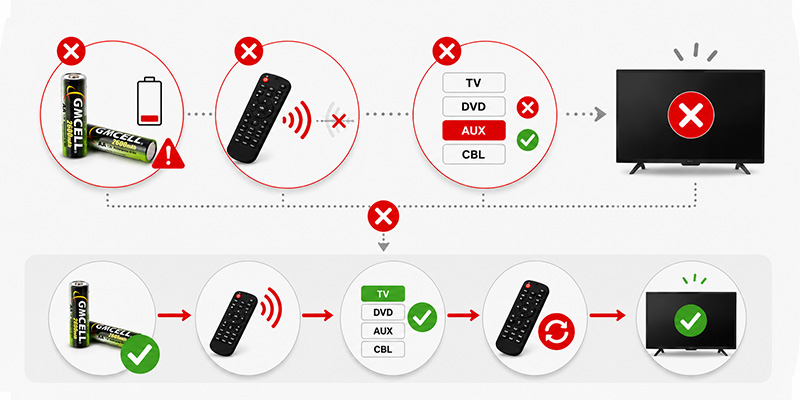
Before you reset the remote, search for another code, or assume your device is unsupported, start with the simplest check: the batteries. This is often the first troubleshooting step because weak remote control batteries can make a remote look functional while still preventing it from sending a strong signal.
As batteries age, their voltage can drop, internal resistance can rise, and current output can become less stable. That matters because a remote does not just need enough power to light an LED. It also needs enough power to send clear infrared commands across the room.
A remote that lights up is not always a remote that works.
The indicator light may still flash, but the infrared signal may already be too weak for reliable pairing or device control.
If your universal remote codes fail repeatedly, replace the old batteries with fresh ones, make sure they are installed correctly, and then try the setup process again. This small step can save you from testing dozens of codes that were never the real problem.
How Weak Batteries Affect Infrared Signal Performance
Most universal remotes use an infrared LED to send commands. When you press a button, the remote sends a short burst of light that your TV, cable box, or audio device reads as a control signal. For that burst to work, the remote needs both instant current and stable voltage.
Weak batteries can still power the small indicator light on the remote, but they may not provide enough energy for a strong infrared pulse. That is why your remote may look alive while the device still ignores the command.
When battery power drops, you may see:
Shorter remote control distance
Weaker infrared signal output
Missing or incomplete commands
Failed pairing during setup
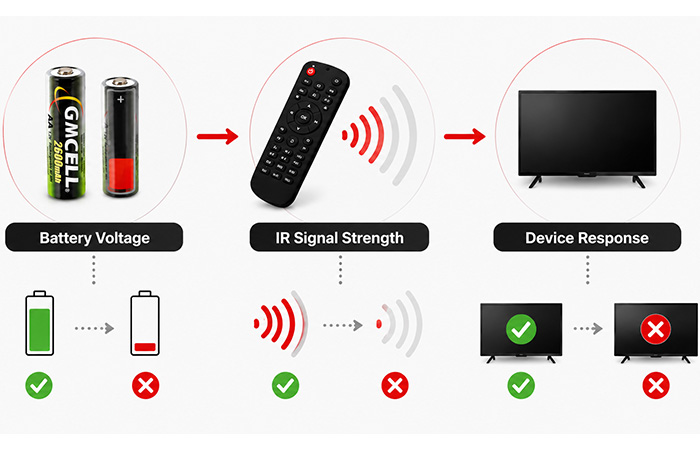
A good way to think about it is simple: battery voltage supports infrared signal strength, and signal strength determines whether the device gives a response. If the first part of that chain is weak, the whole setup can fail even when the code is correct.
Can Rechargeable Batteries Be Used in Universal Remotes?
Yes, rechargeable batteries can be used in many universal remotes. For everyday TV remotes, streaming remotes, and home entertainment controllers, rechargeable cells can be a practical choice, especially if the remote is used frequently.
The important point is that not all battery types behave the same way. A remote that accepts AA or AAA cells may work with different chemistries, but each option has its own voltage behavior, runtime, and cost profile.
Alkaline
Common, easy to buy, and suitable for occasional use, but disposable over time.
NiMH
Rechargeable, cost-efficient for frequent use, and widely used in AA and AAA formats.
Lithium AA
Lightweight and long-lasting, but often more expensive and not always necessary for basic remotes.
NiMH vs Alkaline Batteries for Universal Remotes
If your universal remote codes keep failing, battery type may not be the only issue, but it can affect how reliably the remote sends commands. Most remotes can work with alkaline batteries, while many also work well with rechargeable NiMH cells.
The better choice depends on how often you use the remote, how many remotes you have at home, and whether you prefer disposable convenience or long-term rechargeable use.
| Factor | Alkaline Batteries | NiMH Batteries |
|---|---|---|
| Voltage | Usually 1.5V when new | Usually 1.2V nominal, with stable output during use |
| Cost | Lower upfront cost | Higher upfront cost, lower long-term cost after repeated charging |
| Lifespan | Single-use, then replaced | Rechargeable for many cycles when used and stored properly |
| Environmental Impact | More waste over time | Less disposable battery waste with repeated use |
| Rechargeability | Not rechargeable | Rechargeable and practical for frequent-use remotes |
When Alkaline Makes Sense
Alkaline batteries are fine if you use the remote occasionally, want a quick replacement, or do not want to manage charging.
When NiMH Makes Sense
NiMH is usually more practical if your remote is used daily, you have several household remotes, or you want a rechargeable option with lower long-term waste.
If you’re considering rechargeable options, understanding how modern NiMH Batteries perform in low-drain household electronics can help you choose the most practical long-term solution.
Common Battery Mistakes That Prevent Successful Programming
If a remote still fails after you enter the correct code, check how the batteries are being used. Small battery mistakes can create confusing remote programming problems, especially during setup when the remote needs to send repeated commands.
Mixing Old and New Batteries
One weak cell can pull down the whole set and reduce signal strength.
Mixing Different Battery Brands
Different cells may drain unevenly and make the remote behave inconsistently.
Using Partially Charged Cells
A remote may light up but fail during repeated code testing or auto search.
Incorrect Battery Installation
Wrong polarity can stop the remote from powering correctly or cause intermittent behavior.
Battery Leakage Damage
Corrosion inside the battery compartment can block power delivery even with fresh cells.
Why Some Rechargeable Batteries Last Longer in Remote Controls
A remote control is usually a low-drain device. It does not use much energy at one time, but it needs dependable power whenever you press a button. That is why the best rechargeable battery for a remote is not always the one with the biggest number printed on the label.
What matters more is how well the battery holds charge during storage, how many times it can be recharged, and how stable its voltage remains during everyday use. For a deeper comparison of battery sizes, chemistries, and expected runtime in household remotes, this guide to Remote Control Batteries provides additional practical examples.
Self-Discharge
Low self-discharge cells hold their charge better when the remote sits unused for days or weeks.
Cycle Life
A good rechargeable cell can be charged many times, which lowers replacement cost over time.
Voltage Stability
Stable voltage helps the remote send consistent infrared commands during everyday control.
Other Reasons Universal Remote Codes May Not Work
Once you have checked the batteries, it is time to look at the rest of the setup. Many universal remote codes not working problems happen because the remote is sending the wrong type of command, following the wrong setup order, or trying to control a device it does not fully support.
Wrong Device Mode
A universal remote usually has different modes such as TV, DVD, AUX, and CBL. If you enter a TV code while the remote is still in AUX mode, the code may fail even if it is technically correct.
Incorrect Programming Sequence
Some remotes require you to hold the setup button, wait for a light, choose the device type, enter the code, and then save it. Missing one step can make the setup fail.
Unsupported Device
Some newer TVs, streaming boxes, or soundbars may not be fully supported by older universal remotes. In that case, no code in the list may give full control.
IR Sensor Problems
If the infrared sensor on the device is blocked, dirty, or damaged, the remote signal may never reach the receiver properly.
Hardware Damage
Dropped remotes, worn buttons, corroded battery contacts, or old internal components can all make a remote unreliable even after successful programming.
How to Test Whether the Problem Is the Remote or the Code
If you are not sure whether the problem comes from the remote, the batteries, or the code itself, use a simple phone camera test. This works because many phone cameras can detect infrared light that your eyes cannot see.
Quick Camera Test
Open your phone camera.
Point the remote’s front LED at the camera.
Press any button on the remote.
Look for a flashing light on your phone screen.
If you see a flashing light, the remote is at least sending an infrared signal. If there is no flash, the issue may be a battery problem, an IR problem, or damage inside the remote.
If the signal appears clearly but your device still does not respond, the issue is more likely related to the programming process, device mode, unsupported code, or the receiving sensor on the device.
When Should You Replace Remote Control Batteries?
You do not need to wait until the remote completely stops working. In many cases, remote control batteries become weak gradually, and the first signs show up as small annoyances during everyday use.
If your universal remote codes start failing more often, or the remote becomes less responsive than before, replacing the batteries should be one of the first checks you make.
Slower Response
If the TV responds a second later than usual, the remote may not be sending a strong enough command.
Shorter Distance
When you need to stand closer to the device, battery voltage or infrared signal strength may be dropping.
Repeated Button Presses
If one button press no longer works reliably, the remote may be losing command strength.
More Pairing Failures
If setup fails more often than before, weak batteries may be disrupting the programming process.
Choosing the Best Rechargeable Batteries for Everyday Remote Use
Rechargeable batteries are most useful when the remote is used often, shared by several people, or part of a larger home entertainment setup. For occasional use, disposable alkaline batteries may still be simple enough. For daily use, rechargeable remote batteries often make more sense.
TV Remote
For a standard TV remote used daily, rechargeable AA or AAA batteries can reduce replacement waste and long-term cost.
Streaming Device Remote
If your streaming remote is used constantly, rechargeable batteries are practical as long as the remote supports replaceable cells.
Smart Home Controller
Smart home controllers may sit unused for long periods, so low self-discharge rechargeable batteries are usually a better fit.
Universal Remote
For a universal remote that controls several devices, stable battery output helps reduce setup interruptions and missed commands.
When is it worth switching to rechargeable batteries?
If you replace remote batteries several times a year, manage multiple remotes, or want to reduce disposable battery waste, rechargeable cells are usually worth considering.
While consumer remotes typically use standard AA or AAA cells, many commercial control devices rely on custom-designed OEM NiMH Battery Packs to achieve longer service life and improved reliability.
Final Thoughts
When your universal remote codes are not working, do not rush to search for another code list right away. In many cases, the code itself is not the real problem.
The issue often comes from weak remote control batteries, poor infrared signal strength, the wrong device mode, or an incomplete setup process. A remote can still light up and look normal while failing to send a strong enough command to your TV, cable box, soundbar, or streaming device.
Check power, signal, and setup before blaming the code.
This simple order can help you restore control faster and avoid wasting time testing dozens of codes that may already be correct.
Start with fresh batteries, make sure the remote is in the correct mode, test the infrared signal with your phone camera, and then try the programming steps again. This gives you a much clearer answer: whether the problem is the battery, the signal, the setup process, or the device compatibility.
Frequently Asked Questions
Why are my universal remote codes not working?
Your universal remote codes may not work because of weak batteries, the wrong device mode, an incorrect setup sequence, blocked infrared signal, unsupported device compatibility, or damaged remote hardware. The code may be correct, but the remote still needs to send a clear signal.
Can weak batteries stop a universal remote from pairing?
Yes. Weak batteries can reduce voltage and infrared signal strength, which may stop the remote from sending complete commands during setup. This can cause pairing failure even when the code is correct.
How do I know if my remote batteries are too weak?
Signs include slower response, shorter control distance, needing to press buttons several times, failed programming attempts, or a remote LED that lights up while the device still does not respond.
Can rechargeable batteries be used in universal remotes?
Yes. Many universal remotes can use rechargeable AA or AAA batteries. However, performance depends on the remote design, battery type, charge level, and how stable the battery output remains during normal use.
Are NiMH batteries good for remote controls?
NiMH batteries can be a good choice for frequently used remotes because they are rechargeable, reusable, and cost-efficient over time. For low-drain remotes, low self-discharge NiMH batteries are usually more practical than high-capacity cells that lose charge quickly during storage.
Why does my remote LED light up but still not work?
The LED only shows that some power is available. It does not prove the remote is sending a strong infrared signal. Weak batteries, a damaged IR LED, blocked sensor, wrong mode, or failed programming can still prevent the device from responding.
How often should remote control batteries be replaced?
Replace remote control batteries when response becomes slow, range becomes shorter, buttons need repeated presses, or setup fails more often. For rarely used remotes, also check for leakage or corrosion after long storage.
What is the best battery type for a universal remote?
Alkaline batteries are simple for occasional use. Rechargeable NiMH batteries are often better for frequent use, multiple remotes, and lower long-term waste. The best choice depends on how often you use the remote and whether you prefer disposable convenience or rechargeable value.